
Attribute analysis and statistics
Working with expressions and the field calculator
Write Orbis expressions to calculate new fields, combine conditions and transform text, using the Field calculator and the Expression console.
You will learn
- Create a calculated field with the Field calculator.
- Use operators, functions, CASE and NULL handling in expressions.
- Test expressions in the Expression console.
Data for this tutorial
Sample villages (synthetic) Download villages.zip
- Format
- ESRI Shapefile (ZIP: .shp, .shx, .dbf, .prj, .cpg)
- Geometry
- Point
- CRS
- EPSG:4326 (WGS 84 longitude, latitude)
- Content
- 25 villages in 5 districts of 2 states
Fields used in the tutorials
| Field | Type | Description |
|---|---|---|
village_id | text | Identifier V001 to V025. |
village | text | Village name. Common names repeat (Rampur, Shivpur, Madhopur), as they do in real gazetteers. |
district | text | District: Rampur, Varanasi, Jaunpur, Patna or Gaya. |
state | text | State: Uttar Pradesh or Bihar. |
population | integer | Residents. One village (Amarpur) has no recorded population (NULL). |
households | integer | Households. |
has_school | text | yes or no. |
Wards (synthetic) Download wards.geojson
- Format
- GeoJSON
- Geometry
- Polygon
- CRS
- EPSG:32643 (WGS 84 / UTM zone 43N)
- Content
- 84 wards (31 peri-urban, 19 rural, 34 urban), 333,497 residents
- In Orbis
- Browser panel ▸ Tutorial sample data (synthetic) ▸ Wards, or Load complete tutorial pack.
Fields used in the tutorials
| Field | Type | Description |
|---|---|---|
ward_id | text | Ward code W01 to W84. |
ward_name | text | Ward name. |
zone | text | urban, peri-urban or rural. |
population | integer | Residents. |
households | integer | Households. |
area_km2 | real | Ellipsoidal area in km². |
density_km2 | real | Persons per km². |
literacy_rate | real | Literate share, per cent. |
Licence: CC0 1.0. All tutorial data is synthetic and generated by Orbis. About the datasets
The task
You want to add a field with the average number of persons per household of each village, and a size class (small, medium, large) for each village.
Steps
- Load
villages.zip. Open the attribute table and click Field calculator in its toolbar (or find Field calculator in the Toolbox).
Set Result field name to
persons_per_hh, Result type to Decimal number (real) and type the expression:"population" / "households"The line under the box shows the value for the first village. Click Run. A new layer with the field is added; the input layer is not changed.
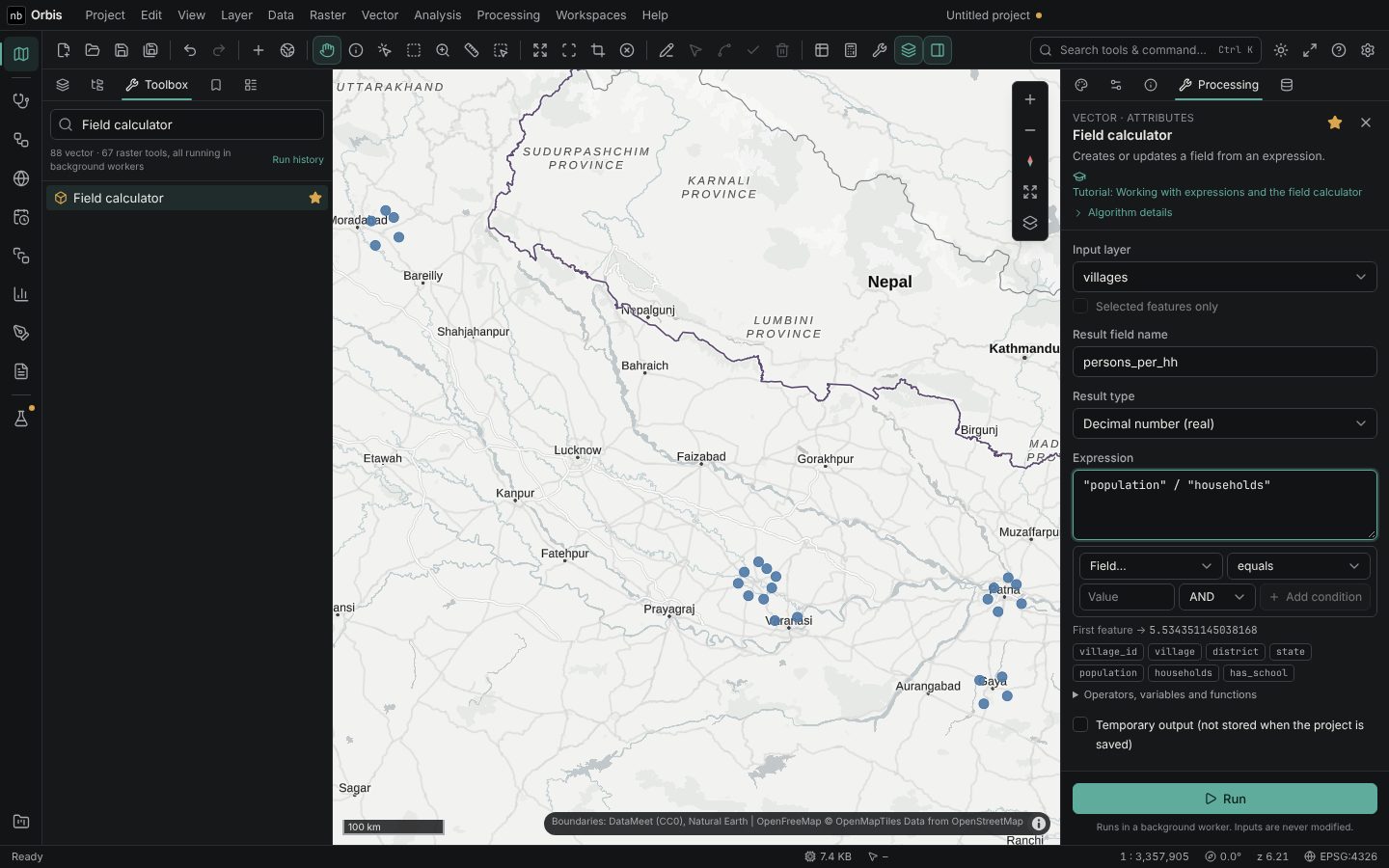
The Field calculator.
Run the Field calculator again on the new layer with Result field name
size, Result type Text (string) and:CASE WHEN "population" IS NULL THEN 'unknown' WHEN "population" < 2000 THEN 'small' WHEN "population" < 5000 THEN 'medium' ELSE 'large' END
- Try expressions without creating fields in the Expression console (bottom panel). It evaluates an expression for the active layer.
Expression essentials
| You write | Meaning |
|---|---|
"field" | the value of a field (double quotes) |
'text' | a text value (single quotes) |
+ - * / % ^ | arithmetic; division by zero gives NULL |
= != < <= > >=, AND OR NOT | comparisons and logic |
IN (…), BETWEEN a AND b, LIKE, ILIKE | lists, ranges and text patterns (% any text, _ one character) |
IS NULL, IS NOT NULL, coalesce(a, b) | missing values |
upper(), lower(), trim(), replace(), concat() | text functions |
round(x, 2), abs(), sqrt(), to_real(), to_int() | numbers and conversion |
$area, $length, $perimeter | geodesic area (m²) and lengths (m) of the feature |
Expected result
The new layer has persons_per_hh (for example 1450 / 262 ≈ 5.53 for the first Shivpur) and size with small, medium, large or unknown.
Common mistakes
- Integer result type for a ratio. Whole number (integer) rounds 5.53 to 6. Use Decimal number (real).
- NULL in arithmetic. Any calculation with NULL gives NULL; Amarpur gets NULL persons per household. Use
coalesce("population", 0)only if 0 is really correct.
Troubleshooting
- "Unknown field". Check the spelling and the double quotes; click a field name below the box to insert it.
- Text compared with numbers.
"code" = 5never matches a text field that holds "5"; write'5', or convert withto_int("code").