
Attribute analysis and statistics
Calculating sum, average, minimum and maximum by group
Summarise a numeric field for every group: total, average, smallest and largest population of the villages in each district, with NULL values handled correctly.
You will learn
- Add several aggregates to one summary.
- Understand how NULL values affect sums and averages.
- Rename output fields and read decimal results.
Data for this tutorial
Sample villages (synthetic) Download villages.zip
- Format
- ESRI Shapefile (ZIP: .shp, .shx, .dbf, .prj, .cpg)
- Geometry
- Point
- CRS
- EPSG:4326 (WGS 84 longitude, latitude)
- Content
- 25 villages in 5 districts of 2 states
Fields used in the tutorials
| Field | Type | Description |
|---|---|---|
village_id | text | Identifier V001 to V025. |
village | text | Village name. Common names repeat (Rampur, Shivpur, Madhopur), as they do in real gazetteers. |
district | text | District: Rampur, Varanasi, Jaunpur, Patna or Gaya. |
state | text | State: Uttar Pradesh or Bihar. |
population | integer | Residents. One village (Amarpur) has no recorded population (NULL). |
households | integer | Households. |
has_school | text | yes or no. |
Licence: CC0 1.0. All tutorial data is synthetic and generated by Orbis. About the datasets
The task
For each district you want the total population, the average village population, and the smallest and largest village population.
Steps
- Load
villages.zip, open the attribute table and click Group and summarize.
- Tick district under Group by fields.
Under Aggregates, keep Count records. Then click Sum, Average, Min and Max next to Add. Each new aggregate takes the first numeric field,
population; check that every one showspopulationin its field list.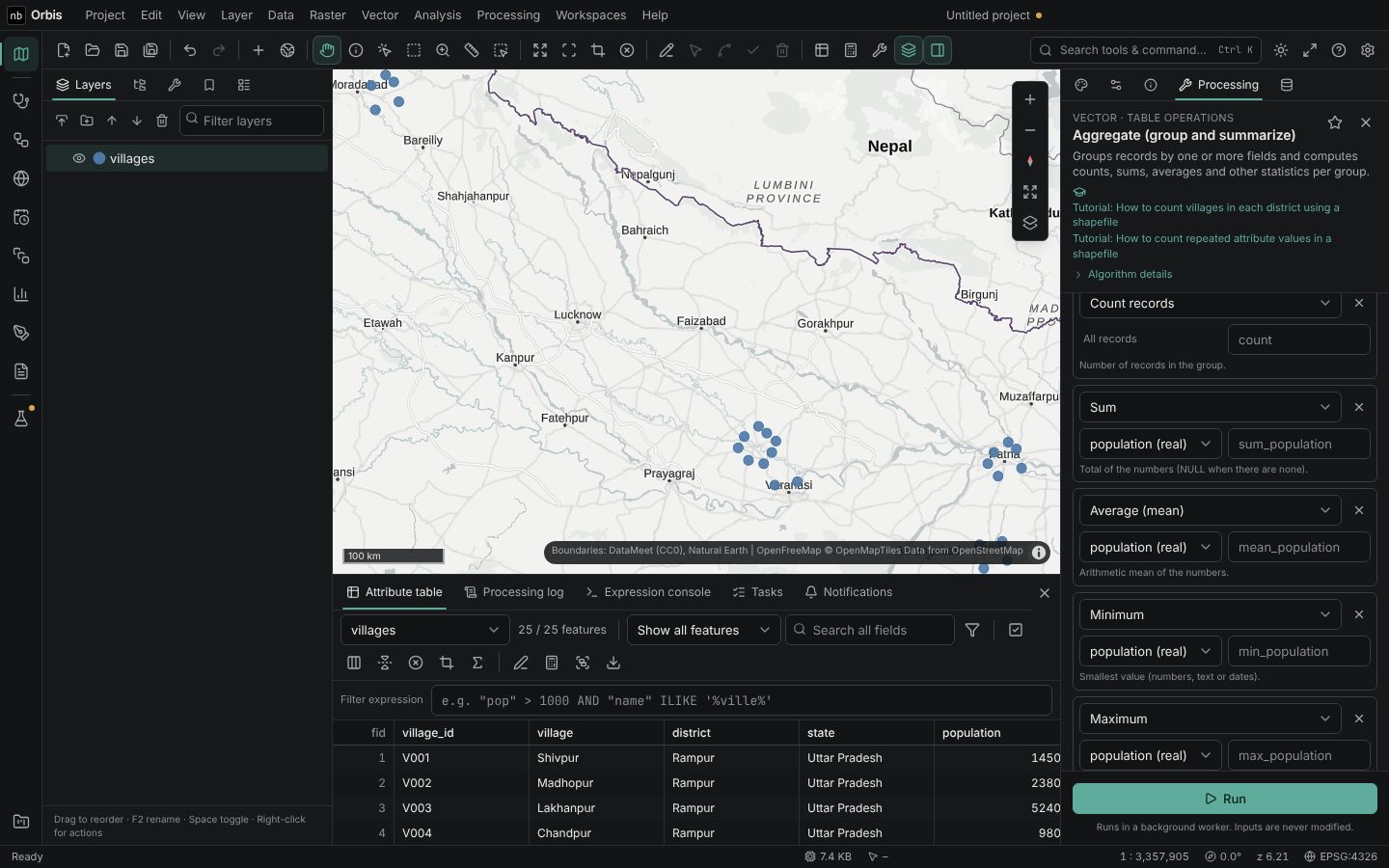
Several aggregates in one run.
- Click Run. The table Summary by district (villages) opens.
Expected result
| district | count | sum_population | mean_population | min_population | max_population |
|---|---|---|---|---|---|
| Gaya | 4 | 12300 | 3075 | 1580 | 4720 |
| Jaunpur | 8 | 21080 | 3011.43 | 960 | 5890 |
| Patna | 6 | 29270 | 4878.33 | 1340 | 7210 |
| Rampur | 5 | 16170 | 3234 | 980 | 6120 |
| Varanasi | 2 | 10550 | 5275 | 3150 | 7400 |
Averages are shown here to two decimals; Orbis shows up to 12 significant digits (3011.42857142857). The sums add up to 89,370 residents.
Look at Jaunpur: it has 8 villages but its average is the sum divided by 7, because Amarpur has no recorded population. NULL values are left out of SUM, AVG, MIN and MAX, never treated as zero.
Common mistakes
- Averaging averages. The mean of the district means is not the mean of all villages, because districts have different numbers of villages. Group without fields (leave Group by fields empty) to get the overall mean.
- Summing a text field. Numeric aggregates need a numeric field. If
populationwere stored as text, the tool would refuse it rather than guess numbers from text.
Troubleshooting
- A sum is empty. All values in that group are NULL; SQL and Orbis return NULL rather than 0 for a sum of nothing.
- Unexpected field names. Output names are built from the function and the field (
sum_population). Type your own name in the box next to each field to change it.