
Validating and repairing geometries
Find invalid, empty, duplicate and overlapping geometries with Check validity and the Data Doctor, and repair them with Fix geometries before analysis.
You will learn
- Detect invalid geometries.
- Repair them and check the result.
- Run a full data quality diagnosis.
Prerequisites
Data for this tutorial
Dirty parcels (synthetic) Download dirty_parcels.geojson
- Format
- GeoJSON
- Geometry
- Polygon
- CRS
- EPSG:32643 (WGS 84 / UTM zone 43N)
- Content
- 47 parcels with deliberate problems
- In Orbis
- Browser panel ▸ Tutorial sample data (synthetic) ▸ Dirty parcels, or Load complete tutorial pack.
Fields used in the tutorials
| Field | Type | Description |
|---|---|---|
parcel_id | text | Parcel identifier (contains duplicates). |
landuse | text | Recorded use (inconsistent spelling). |
area_sqm | real | Registered area in m². |
Licence: CC0 1.0. All tutorial data is synthetic and generated by Orbis. About the datasets
The task
The Dirty parcels layer has 47 parcels with deliberate problems: self-intersecting rings, a null and an empty geometry, a duplicate, overlaps and inconsistent attributes. Overlay tools give wrong results on such data, so you check and repair it first.
Steps
- Add Dirty parcels from the tutorial data.
- In the Toolbox, open Check validity, choose Dirty parcels (synthetic) and click Run. The notification reports 2 invalid geometries of 47; the result layer has validity fields you can sort and filter.
- Open Fix geometries and run it on the parcels. The log reports how many geometries were modified and whether any could not be repaired (those become empty).
For a complete diagnosis, open the Data Doctor workspace (activity bar), tick Dirty parcels (synthetic) and click Run diagnostics. It lists 13 findings, among them self-intersecting polygons (features 5 and 23), zero-area polygons, null and empty geometries, duplicate geometries and records, overlaps and invalid numeric values, with a quality score.
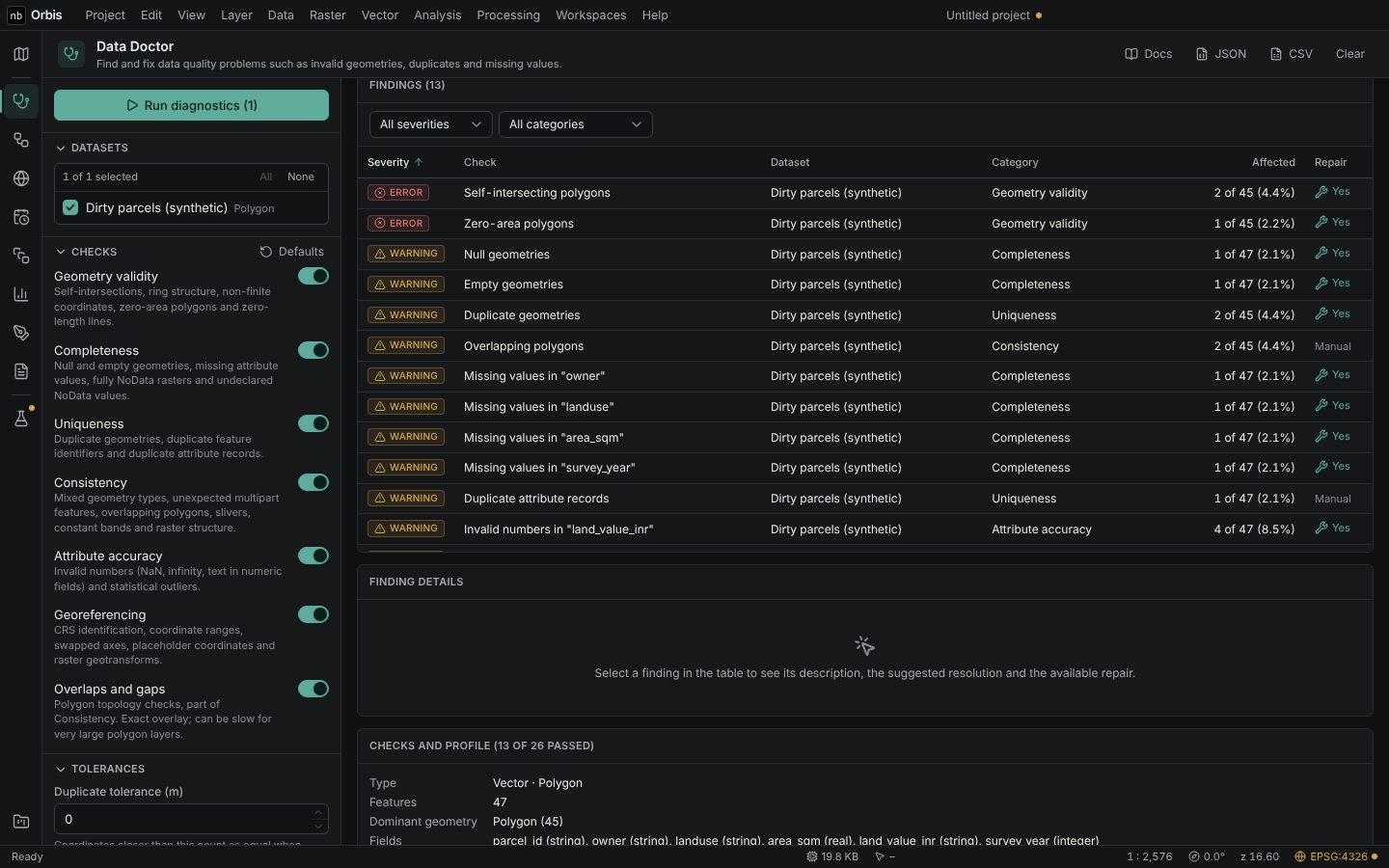
Data Doctor findings for the dirty parcels.
- Select a finding to see the affected features, and use the repair actions (such as Repair invalid geometries) to create corrected copies.
- Remove leftovers with Remove null geometries and Delete duplicate geometries from the Toolbox.
Expected result
A repaired copy of the parcels without self-intersections, with the remaining issues listed in the Data Doctor. The original layer is never changed.
Common mistakes
- Fixing silently changes shapes. A bow-tie polygon becomes a multipolygon of two triangles. Check repaired features on the map.
- Ignoring attribute problems. Text such as "n/a" in a numeric column is not a geometry problem but breaks sums; the Data Doctor reports it as invalid numeric values.
Troubleshooting
- A geometry could not be repaired. It becomes empty and is counted in the log. Digitise it again or remove it.